
01 — Overview
Overview
a. Concept & Multi-Platform Ecosystem
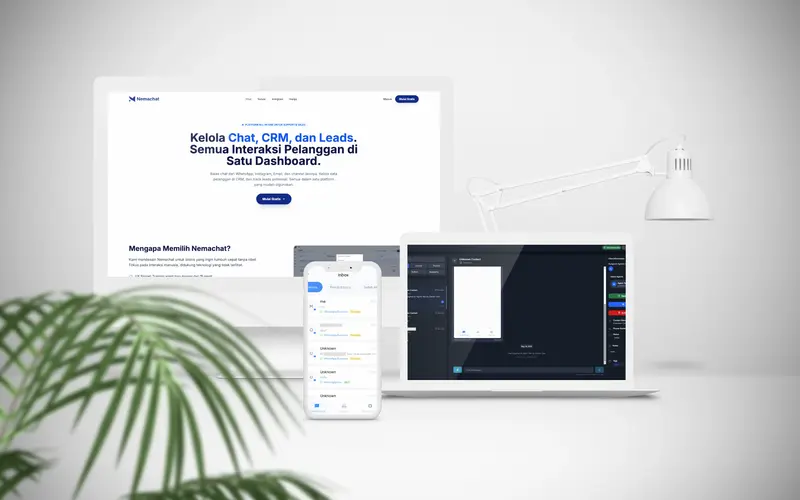
NemaChat is an omnichannel customer support and sales platform designed specifically for Indonesian small-to-medium enterprises (SMEs) drowning in customer chats. We built NemaChat as a unified ecosystem of four decoupled repositories, enabling business agents to handle queries from WhatsApp, Instagram DM, Telegram, and Email inside a single fast screen while keeping track of deal pipelines.
The ecosystem consists of: (1) `nema-chat`, the core PHP Laravel 12 backend serving as the centralized business CRM, client portal, and multi-tenant agent database; (2) `nema-chat-wa-lite-gateway`, a high-throughput WhatsApp engine written in Go using the whatsmeow socket library; (3) `nema-chat-web`, the client-facing multilingual landing page website built with Astro v5 and Tailwind CSS; and (4) `nemachat-mobile`, a Flutter-based mobile companion app currently prepared as a work-in-progress (WIP) build.
b. High-Level Architecture Flow
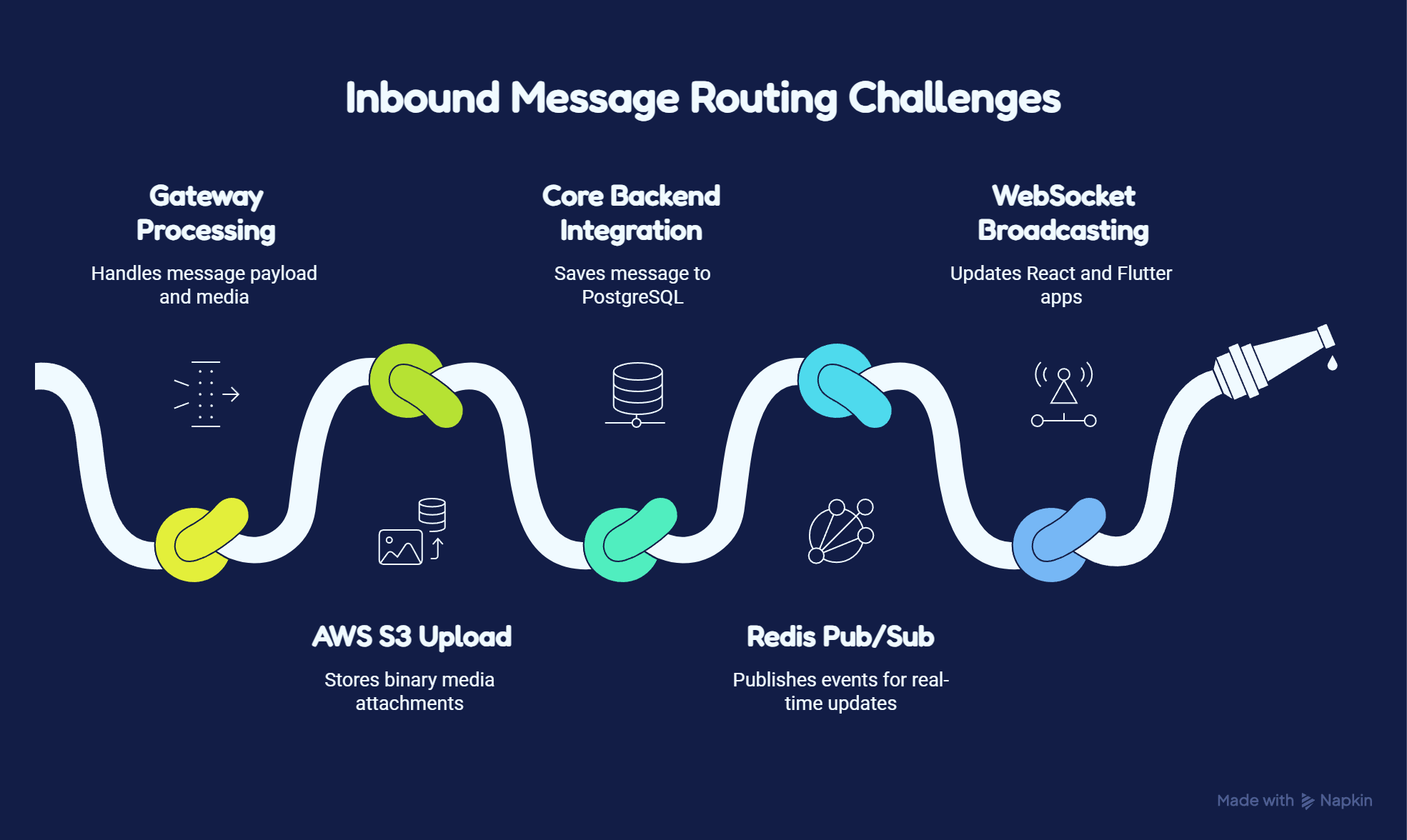
We designed a decoupled, event-driven microservice-like architecture to handle high volumes of chats without degrading user interface performance. When a customer sends a message on WhatsApp, it is captured by the Go WhatsApp gateway client. The gateway downloads any attached media, uploads it to AWS S3, and immediately triggers an HTTP POST webhook to the Laravel core backend.
The Laravel backend receives the webhook, parses the JID or sender details, creates or updates the Conversation and Message records in PostgreSQL, and pushes the event to Soketi (a self-hosted WebSocket server). The Inertia.js React dashboard and the Flutter mobile client receive these real-time notifications via standard WebSocket subscriptions, updating the chat UI dynamically. Outgoing agent responses are sent via Laravel controllers which relay HTTP POST API requests to the Go gateway, initiating socket delivery to WhatsApp servers.
- Designed & built the multi-platform system architecture
- Coded the Go WhatsApp API gateway & events listener
- Developed the Laravel CRM & Filament admin portal
- Implemented Inertia.js React unified chat workspace
- Architected the unreleased Flutter mobile app layout
- Wrote multilingual Astro landing page & geo-redirects
02 — Problems & Challenges
Problems & Challenges
a. Gateway Session Handling
Maintaining hundreds of concurrent, persistent WhatsApp connections without official API keys is highly unstable. In-memory session tokens can drop randomly, and the gateway must keep sessions alive across process restarts to avoid forcing merchants to re-scan QR codes constantly.
We solved this in the Go gateway (`nema-chat-wa-lite-gateway`) by implementing a database-backed device store using whatsmeow's SQLStore container mapped to our PostgreSQL database. We built a dynamic Instance Manager using `sync.RWMutex` to manage in-memory `ClientWrapper` maps. When the server boots, the `RestoreAll()` function queries all connected instances and concurrently restores their connections. If pairing is required, we set up a context-controlled QR channel generation routine that outputs base64 PNG data URLs using `go-qrcode` and updates the instance status to `qr_required`, automatically cleaning up the connection if the scan limits are exceeded (capped at 5 refreshes).
b. Real-time Message Queuing
Inbound WhatsApp webhooks containing heavy binary attachments (such as PDFs, audio notes, or images) can bottleneck the API gateway and the core backend, leading to dropped messages and slow sync rates.
We built a resilient, non-blocking media pipeline. When an event is received, `handleMessage` checks for media content. If media exists, the gateway streams the binary payload directly from WhatsApp's CDN, detects the content type using MIME type mapping, and uploads the bytes to AWS S3. The gateway then swaps the binary data for a public S3 CDN URL in the webhook metadata before executing a fire-and-forget HTTP POST to the Laravel backend. To prevent contact name decay, the gateway stores contact profiles in the database and asynchronously queries WhatsApp for updated profile pictures, keeping profile photo refreshes out of the main message flow.
c. Web & Mobile State Sync
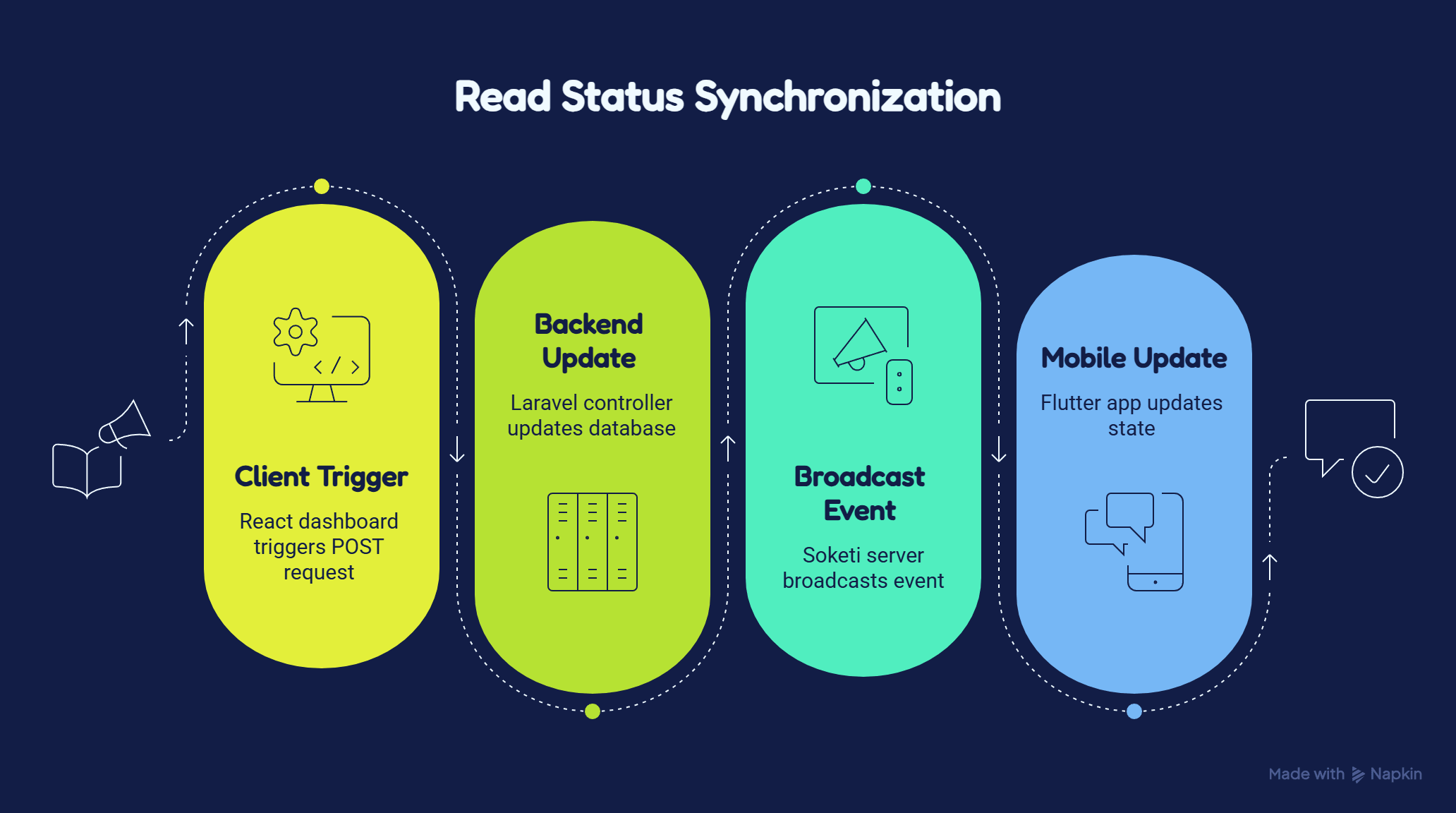
Keeping the unified inbox synchronized across the React web dashboard and the Flutter mobile client in real time is critical. An agent marking a conversation as read, assigning it to a division (e.g., Support or Sales), or sending a reply must update all other agents' screens instantly.
We integrated Laravel Octane with Soketi Redis Pub/Sub to serve as the real-time event dispatcher. On the web client, we built a custom React state context that listens to WebSocket channels using Pusher-JS. On the mobile client, we configured `dart_pusher_channels` to listen to Soketi WebSocket streams, updating local Riverpod providers and list models dynamically. We implemented exponential connection retry logic inside the Flutter app to maintain stability over unreliable cellular connections.
03 — Project Goals
Project Goals
a. Omnichannel Communication
Our primary goal was to consolidate separate messaging pipelines—WhatsApp, Instagram DM, Telegram, and Email—into a single, unified inbox interface. We designed the dashboard layout to keep average message processing latency under 150ms.
By establishing a structured, unified message payload format across all channels, we made it simple to add new messaging providers without altering the front-end React interface or the state sync models.
b. Seamless User Experience
SME owners need a frictionless experience to train new agents quickly. We targeted a setup time of under 15 minutes, which required a simple, intuitive user interface.
We designed automatic division routing (directing conversations to divisions like Sales or Support based on keyword prompts) and structured billing panels inside Laravel Filament, providing merchants with absolute transparency regarding their usage limits, billing packages, and invoices.
04 — Design Process
Design Process
a. Core API & Database Modeling
We modeled the database schema to support multi-tenancy from day one. An `Organization` owns multiple `OrganizationPlatform` connections, `Users` with specific division roles, `Contacts` unified across channels (with platform-specific JIDs in `ContactPlatform`), and `Conversations` that track active assignments, divisions, and tag listings.
We leveraged GORM in Go and Eloquent in Laravel to write performant database queries, ensuring proper foreign key cascade rules to prevent orphan sessions and transaction records when a merchant deletes an integration.
b. Web Dashboard UI/UX
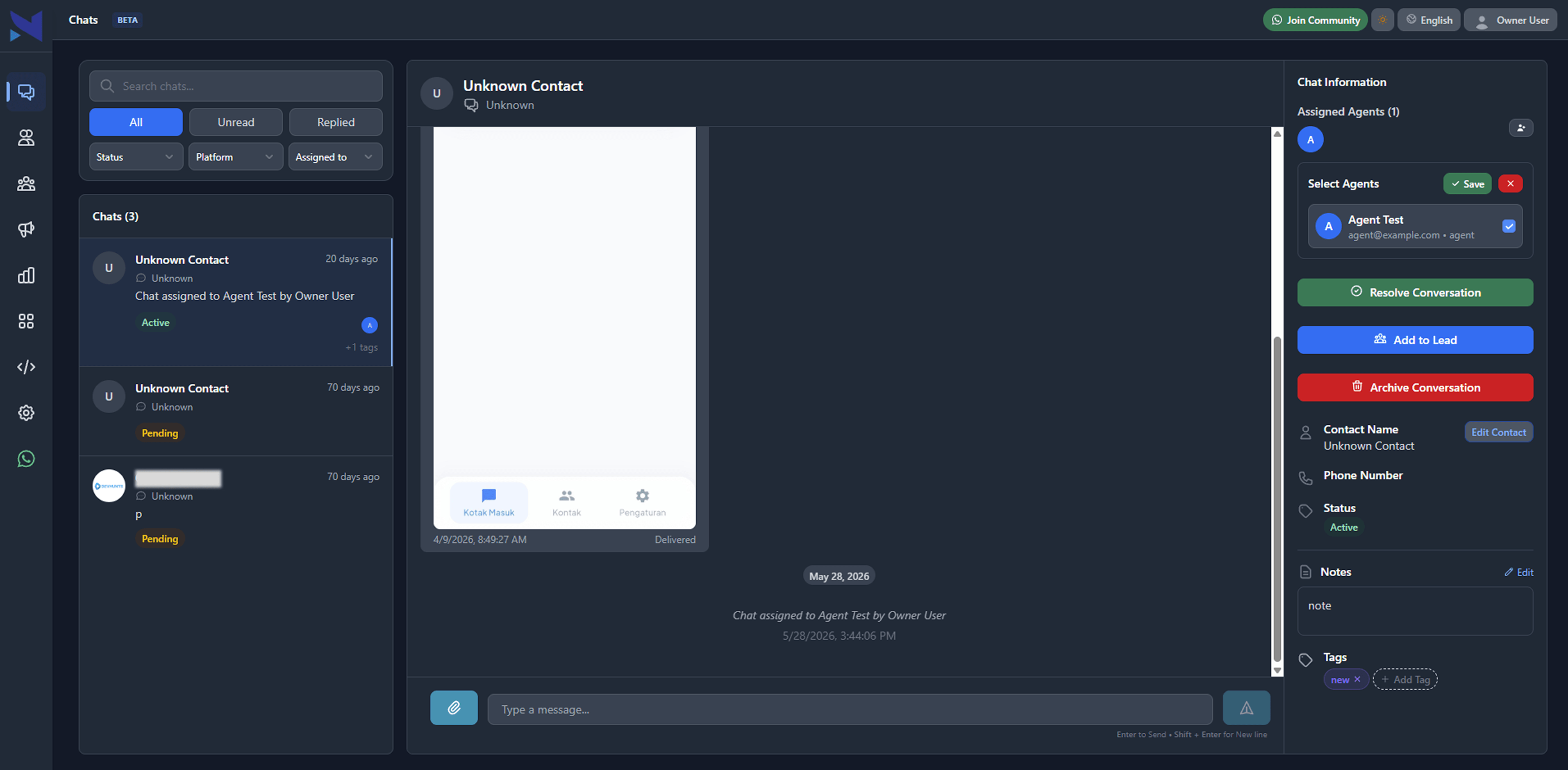
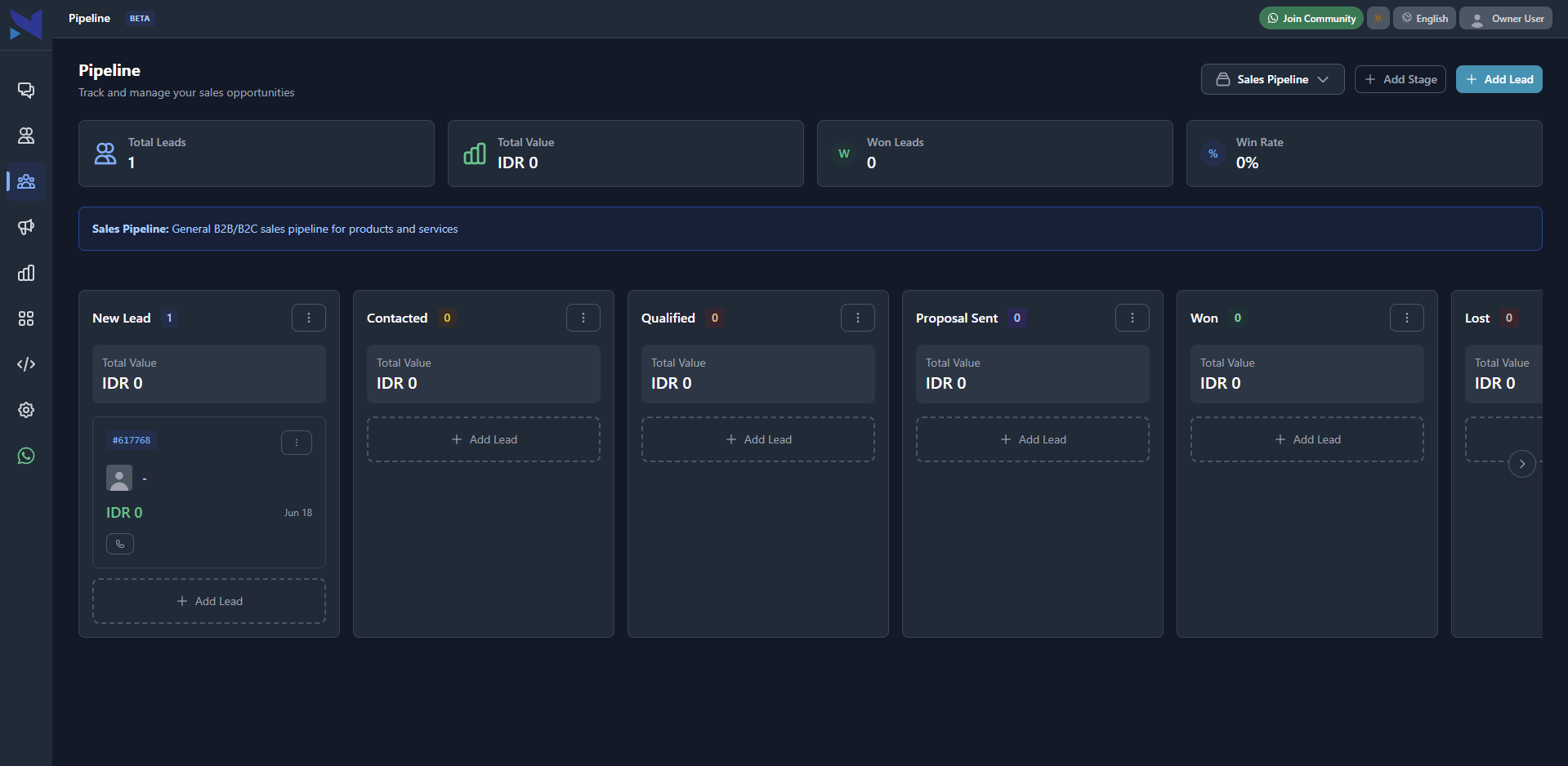
We designed the multi-column React chat layout to maximize productivity. The left panel shows the searchable active chat queues; the middle displays the conversation thread with rich text and media players; and the right panel loads the integrated CRM context, showing customer details, transaction history, and custom lead pipeline card fields.
We built the client interface with React, Tailwind, and custom SCSS components, styling interactive transitions for chat assignment changes, lead pipeline stage changes, and CSAT survey generation.
c. Mobile App Blueprint
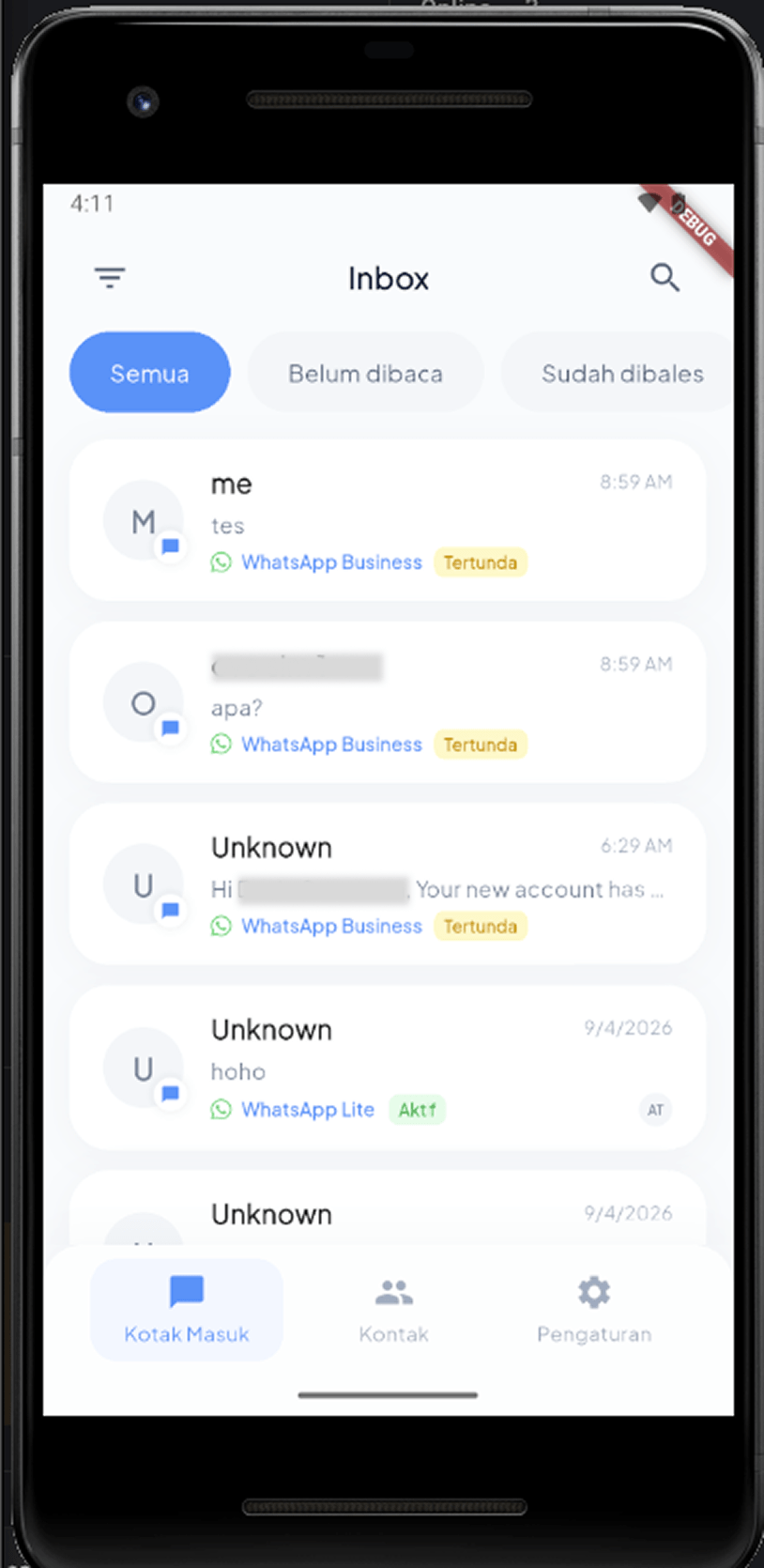
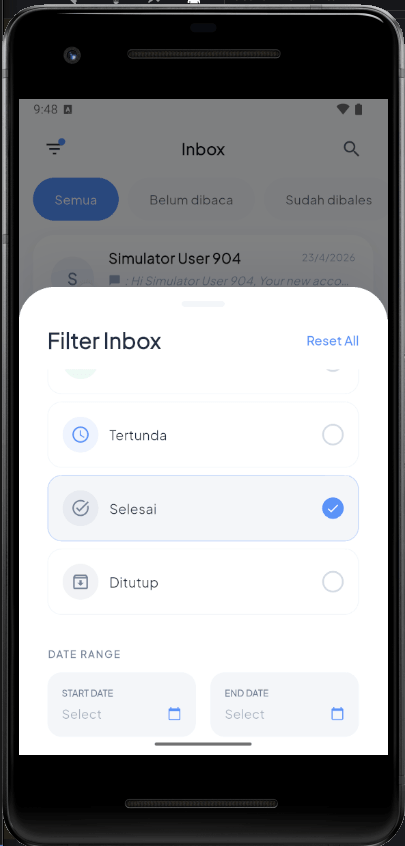
We mapped out a Flutter app layout optimized for mobile screens. The mobile interface uses a bottom navigation bar pointing to Chats, Contacts, Pipelines, and Settings. We designed the unified chat screen to support rapid text input, voice note playback, and image viewing.
We constructed Riverpod providers to decouple the business logic from visual widgets, preparing state structures to sync seamlessly with the Laravel database.
05 — Usability Testing
Usability Testing
a. Message Throughput Testing
We executed load testing on the Go gateway to evaluate message delivery under high traffic. Using concurrency tests, we validated that the gateway handles up to 5,000 inbound messages per minute without losing socket packets or dropping webhooks.
We monitored memory usage in whatsmeow and optimized connection pooling, ensuring SQL connections release back to the pool promptly.
b. Error & Disconnect Handling
We simulated network drops in the Go gateway to verify connection recovery behavior. The gateway intercepts disconnect events via whatsmeow handlers and triggers a re-connection loop with a 3-second base delay and up to 5 seconds of random jitter, preventing server overloading.
We set up structured logs using Zap (`go.uber.org/zap`) to record API failures, webhook delivery errors, and token mismatches, providing real-time visibility into engine health.
06 — Prototyping & Handoff
Prototyping & Handoff
a. API Gateway Integration
We created the REST API specification using Swagger (`github.com/swaggo/swag`), which is served directly by the Go gateway at `/api-docs`. Every endpoint requires API key authentication via the `x-api-key` header.
This schema definition makes it easy for other systems to communicate with the gateway, standardizing JSON payloads and error codes (such as `401 Unauthorized` and `404 Not Found`).
b. Unreleased Mobile App Preparation
Since the Flutter mobile application is not yet released, we focused on building a solid code architecture for future compilation. We configured deep links via GoRouter, integrated Firebase Cloud Messaging for background notifications, and set up Sentry for error tracking.
We structured the Flutter build scripts (`pubspec.yaml`, gradle configurations, and iOS info.plist fields) to support instant package builds as soon as the client authorizes the release of the mobile application.
07 — Key Takeaways
Key Takeaways
a. Lessons in Microservice-like Architecture
Decoupling the WhatsApp connection engine from the main PHP CRM application was a critical architectural decision. Using Go to run the whatsmeow socket instances keeps the system lightweight and ensures that high-volume message delivery does not exhaust the web application's resource pool.
b. Managing Multi-repo Projects
Engineering a multi-repo project (Laravel, Go, Astro, React, and Flutter) highlighted the importance of maintaining strict API contracts. Documenting schemas and automating integration checkpoints saved weeks of debugging and ensured that updates in one repository did not break downstream consumer applications.